
Bot detection at checkout and signup: what actually works
Bot detection is the set of checks that tell automated clients apart from real browsers and apps. At checkout and signup it looks for scripting, emulators, headless browsers and impossible velocity. Alone it is incomplete; the strongest setups combine bot signals with device linking, payment context and rules tested in shadow mode before they block anyone.
Updated · RiskCogs team
Key facts
- Bots drive card testing, credential stuffing, inventory hoarding and fake account creation.
- Simple CAPTCHAs slow casual scripts but fail against residential proxies and anti-detect browsers.
- Useful signals include webdriver traces, automation flags, emulator hints, TLS fingerprints and request velocity.
- False positives hurt conversion, so most teams score and challenge before they hard-block.
What is bot detection?
Bot detection decides whether a request comes from automation rather than a person using a normal browser or app. In payments and account security it is a signal layer, not a full fraud decision on its own.
Attackers use scripts, headless browsers, emulators and anti-detect tools. Defenders look for traces of those tools and for behaviour that humans rarely produce at the same speed.
Where bots hit merchants
- Card testing and BIN attacks on checkout.
- Credential stuffing on login.
- Fake account creation and promo farming at signup.
- Inventory bots on limited drops.
- OTP and SMS pumping against messaging gateways.
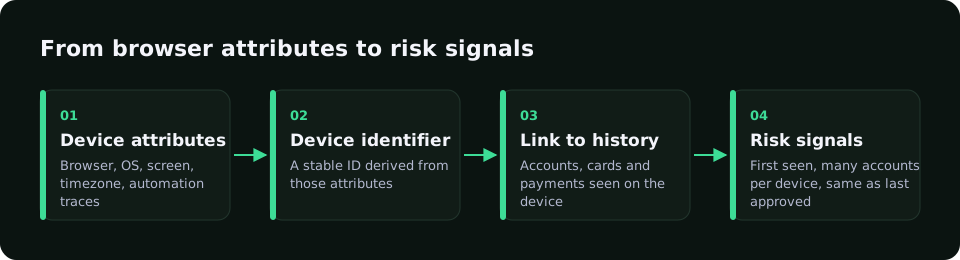
Signals used in bot detection
No single flag is enough. Combine client integrity, network and velocity.
How to roll out bot controls without wrecking conversion
- Measure baseline bot-like traffic before you block anything.
- Start with challenges or step-up, not hard denies, for medium scores.
- Combine bot signals with device, email and payment context.
- Test new thresholds in shadow mode against real approvals and chargebacks.
- Review false positives with support weekly during the first month.
Bot mitigation: what to do once a bot is detected
Bot mitigation is the response layer after detection. Common actions are rate limits, silent monitoring, challenges such as CAPTCHAs or one-time codes, tarpitting and hard blocks.
Match the action to the page and the risk. Checkout and login deserve stricter responses than content pages, and borderline traffic should be challenged rather than blocked, so real customers on shared networks still get through.
- Monitor first to size the problem.
- Rate-limit by device, account and IP, not only IP.
- Challenge the middle band; block only clear automation.
- Review false positives weekly.
Bot signals and how teams use them
| Signal | Suggests | Caution |
|---|---|---|
| Webdriver / automation traces | Scripted browser | Can be spoofed; use with others |
| Headless or emulator hints | Non-human client | Some real test tools look similar |
| Impossible click or typing speed | Automation | Accessibility tools can look fast |
| Data-center IP or known proxy | Hidden origin | Do not block on IP alone |
| High request velocity per IP or device | Burst attack | Tune to your traffic shape |
| Many accounts per device | Farming | Link before you block |
How RiskCogs uses bot and device signals
The RiskCogs browser SDK collects device and browser signals with user consent and sends them with the risk request. RiskCogs uses them for signals such as automation and webdriver traces, tampering with native browser functions, and many distinct devices per email or phone.
RiskCogs returns a score with reason codes so you can challenge or review instead of blocking blindly. It is a risk scoring layer next to your payment provider and does not process payments. See the pricing page for current plans.
See what you would have blocked — free shadow modeFrequently asked questions
What is bot detection software?
Bot detection software tries to tell automated clients from real users using browser, device and behaviour signals. In commerce it is usually one input to a wider risk score that also sees payment, identity and history. Buying a bot tool alone rarely replaces payment risk scoring for chargebacks and card testing.
How do you detect bots on a website?
Teams look for automation traces in the browser, unusual TLS or header patterns, emulators, data-center IPs and request velocity that humans rarely hit. They also link devices across accounts. The useful output is a score or challenge decision, not a single yes-or-no bot label for every visit.
Does CAPTCHA stop checkout bots?
CAPTCHA slows casual scripts and some credential stuffing. It does not stop motivated attackers with farms, anti-detect browsers or human solvers. Use it as friction for medium risk, and pair it with device linking, velocity limits and payment risk scoring for checkout abuse.
What is the difference between bot detection and fraud detection?
Bot detection asks whether the client looks automated. Fraud detection asks whether the payment or account action looks abusive, which may or may not involve bots. Card testing often uses bots; friendly fraud usually does not. Strong setups use both layers together.
What is bot mitigation?
Bot mitigation is what you do after detecting automated traffic: rate limits, monitoring, challenges such as CAPTCHAs or one-time codes, and blocks. Good mitigation matches the action to the risk and the page, so real customers are not stopped along with bots.
Sources and related reading
- OWASP, automated threat materials for credential stuffing and bots — named as text sources only.