Account takeover prevention: protect logins and saved cards
Account takeover prevention stops criminals from logging in to real customer accounts and using their saved cards, balances or rewards. You detect it by comparing each login and payment with the account history: new device, new network, unusual location or automation. Step up authentication when risk rises, and alert the customer on sensitive changes.
Updated · RiskCogs team
Key facts
- Account takeover (ATO) usually starts with leaked passwords reused across sites, phishing or malware.
- Credential stuffing tools test large lists of email and password pairs automatically.
- Warning signs include a first-seen device, a datacenter or proxy IP, and quick changes to email, password or payout details.
- Multi-factor authentication helps, but risk checks are still needed on payments and account changes after login.
How account takeover attacks work
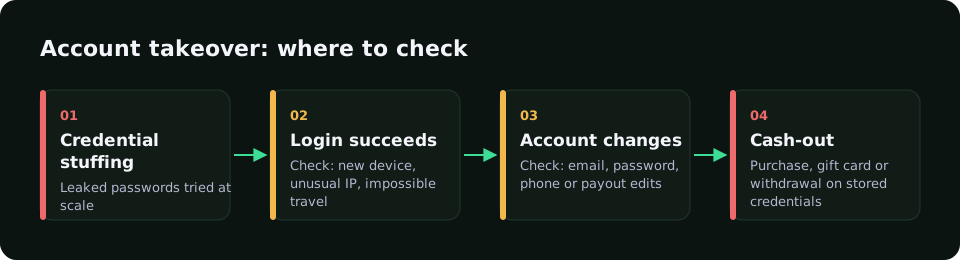
Attackers collect credentials from data breaches or phishing, then use bots to try them on login pages. When a pair works, they change the account email or password, add a new payout method or spend saved cards and balances before the owner notices.
- Bursts of failed logins from rotating IP addresses.
- A successful login from a device never seen on the account.
- Automation traces such as webdriver browsers.
- Email, password, phone or payout details changed right after login.
- A first purchase or withdrawal much larger than the account usual.
Account takeover prevention in five steps
- Rate-limit login attempts per IP, device and account.
- Compare every login with the device and network history of that account.
- Ask for multi-factor authentication when risk is high, not on every visit.
- Hold or review payments and payouts after sensitive account changes.
- Notify customers about new devices and changes, with a quick way to lock the account.
ATO signals and responses
| Signal | What it may mean | Response |
|---|---|---|
| First-seen device on an old account | Login by someone else | Step-up authentication |
| Datacenter, VPN or Tor IP | Masked origin | Raise score, combine with other signals |
| Webdriver or tampering traces | Scripted login or checkout | Block or challenge |
| Email or payout change right after login | Attacker locking out the owner | Hold payouts, notify the owner |
| Same device as past approved payments | Real owner returning | Lower friction |
How RiskCogs helps with account takeover
RiskCogs scores payments with the context an ATO investigation needs: whether the device was seen before, whether it matches the device of the last approved payment, datacenter, VPN and Tor IP detection, how many distinct devices and IPs an email or phone has used, and automation signals from the browser SDK. Device data is collected only with user consent.
You can add allow, watch and block lists for devices, emails and IPs, and test new rules in shadow mode before they affect customers.
See what you would have blocked — free shadow modeFrequently asked questions
What is account takeover fraud?
Account takeover fraud is when a criminal gets access to a real customer account, usually with stolen or reused credentials, and then uses it for gain. Typical actions are buying with saved cards, draining balances or rewards, changing payout details or using the trusted account to commit other fraud.
Does multi-factor authentication stop account takeover?
It blocks many attacks, because a stolen password alone is no longer enough. It is not complete protection: codes can be phished, SIM cards swapped and sessions hijacked. Keep scoring payments and account changes after login, and ask for extra checks when the risk rises.
What is credential stuffing?
Credential stuffing is an automated attack where bots try large lists of email and password pairs from old data breaches on your login page. It works because people reuse passwords. Rate limits, bot detection, device checks and breached-password screening make it much harder to succeed.
How do I spot account takeover without annoying customers?
Use risk-based checks. Most real customers log in from familiar devices and networks, so let them pass smoothly. Add friction only when several signals line up, such as a new device, an anonymous network and a change of payout details, and confirm with the customer through a channel they already trust.
Sources and related reading
- OWASP, Credential Stuffing Prevention Cheat Sheet.
- NIST, SP 800-63B Digital Identity Guidelines: authentication and lifecycle management.
Measure first. Enforce when ready.
Run RiskCogs in shadow mode next to your existing payment setup and review the decisions before they affect a single customer.