Device fingerprinting: how it works and how it helps stop fraud
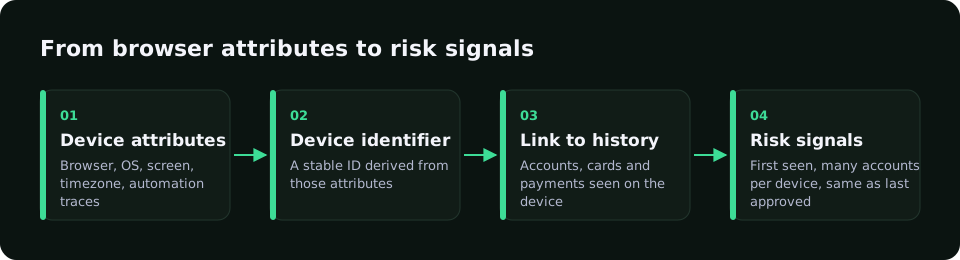
Device fingerprinting combines browser and device attributes, such as screen, language, time zone and rendering traits, into an identifier that helps recognise the same device across sessions. In fraud prevention it links repeated attempts that use different cards, emails or IPs. It works best as one signal in a score, collected with clear consent.
Updated · RiskCogs team
Key facts
- A fingerprint is a probability, not a certainty: browsers update and many devices look alike.
- Its main value is linking activity: many cards, emails or accounts from one device is a strong fraud signal.
- Automation and tampering checks, such as webdriver flags, are often collected in the same step.
- Under GDPR and the ePrivacy rules, device data collection needs a lawful basis and clear notice, and often consent.
What a device fingerprint is made of
A browser SDK reads attributes the browser exposes and combines them into a stable identifier. No single attribute is unique, but together they narrow the field.
- Browser and operating system details, language and time zone.
- Screen size, colour depth and device memory hints.
- Graphics and rendering traits.
- Signs of automation, emulation or overridden browser functions.
How to use device fingerprinting well
- Collect device data only with a clear notice and the consent your policy requires.
- Use the device ID to count cards, emails and accounts per device over time.
- Combine it with network, BIN and history signals instead of blocking on it alone.
- Give trusted devices credit, so returning customers see less friction.
- Review matches regularly, because shared and reset devices create false links.
Device signals in fraud checks
| Signal | What it shows | Use |
|---|---|---|
| Many cards on one device | Card testing or stolen-card use | Raise score, rate-limit |
| Many accounts on one device | Multi-accounting or bonus abuse | Review, link accounts |
| Webdriver or automation flags | Bot traffic | Block or challenge |
| Overridden native functions | Fingerprint spoofing | Raise score |
| Same device as last approved payment | Returning customer | Lower friction |
Device signals in RiskCogs
The RiskCogs browser SDK, @fraud/sdk-browser, collects device and browser signals with user consent and sends them with the risk request. RiskCogs uses them for signals such as automation and webdriver traces, tampering with native browser functions, many distinct devices per email or phone, and a match with the device of the last approved payment.
Card context stays BIN only, and full card numbers are never sent to the scoring API.
See what you would have blocked — free shadow modeFrequently asked questions
Is device fingerprinting legal under GDPR?
It can be, but it is personal data processing. You need a lawful basis, clear information in your privacy notice and, under the ePrivacy rules, consent is often required for reading information from a device. Limit collection to fraud prevention, keep retention short and document the purpose with your legal team.
How accurate is device fingerprinting?
Accuracy varies with the browser, the device and how many signals are available. Privacy features, browser updates and identical devices make some fingerprints change or collide. That is why it should add to a risk score rather than act as a final decision, and matches should be reviewed over time.
What is the difference between a fingerprint and a cookie?
A cookie is a value stored in the browser that the user can delete. A fingerprint is derived from device and browser traits, so it can recognise a returning device even after cookies are cleared. Fraud tools often use both, and both need clear notice to users.
Can fraudsters fake a device fingerprint?
Yes, anti-detect browsers and emulators can change many attributes. Spoofing often leaves traces, though, such as overridden browser functions, inconsistent values or automation flags. Checking for that tampering, together with network and payment signals, makes spoofing much less useful.
Sources and related reading
- European Data Protection Board, Guidelines 2/2023 on the technical scope of Art. 5(3) of the ePrivacy Directive.
- W3C, Mitigating Browser Fingerprinting in Web Specifications.
Measure first. Enforce when ready.
Run RiskCogs in shadow mode next to your existing payment setup and review the decisions before they affect a single customer.