Card testing attacks: how they work and how to stop them at checkout
A card testing attack is when fraudsters run many small payments with stolen or generated card numbers to find out which ones still work. You stop it by watching attempt velocity per device, IP, email and card BIN, flagging bursts of small declined payments, and testing those rules in shadow mode before you block anyone.
Updated · RiskCogs team
Key facts
- Card testing is also called carding, a BIN attack or card cracking. The goal is to validate cards, not to buy anything.
- Typical traces: many attempts from one device or IP in minutes, small or identical amounts, many different cards on the same BIN, and a high share of declines.
- Every attempt can cost you authorization fees, and a rising decline rate can draw attention from your acquirer and card networks.
- Blocking only by IP is weak: attackers rotate proxies and data-center addresses, so device and BIN signals matter as much.
What a card testing attack looks like
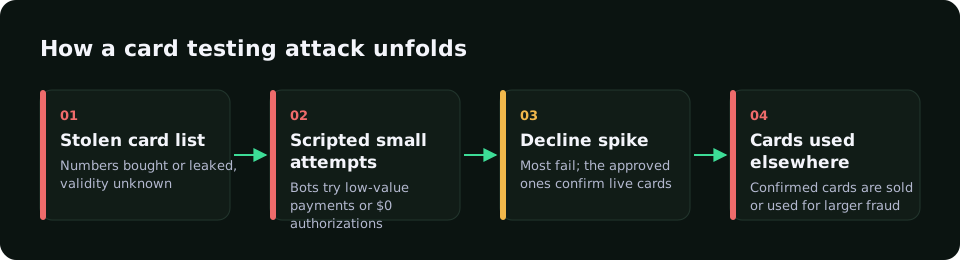
Attackers buy card lists or generate numbers from a known BIN (the first six to eight digits that identify the issuer). They then send them through a checkout, a donation form or a card-on-file step, usually with automation. The amounts are small so the cardholder does not notice, and the successful cards are later used or resold for bigger fraud.
For the merchant the pattern shows up as a spike in payment attempts, a sharp rise in declines with codes such as do not honor or invalid card, and many different cards linked to very few devices, IP addresses or email addresses.
- Short bursts of attempts: tens or hundreds of tries within a few minutes.
- Low, round or identical amounts, often on the cheapest product or a free-trial verification.
- Many distinct card numbers sharing a BIN or a handful of BINs.
- Automation traces: headless or webdriver browsers, empty or scripted user agents, data-center IP ranges.
- Mismatches between card country, IP country and browser time zone.
How to stop card testing in five steps
- Add velocity limits per device, IP, email and card BIN, for example attempts in the last two and ten minutes.
- Flag small-amount bursts and repeated declines from the same device or session.
- Score automation signals such as webdriver flags and data-center IP addresses together, not one by one.
- Run the new rules in shadow mode first and compare what they would have blocked with the real outcomes.
- Enforce the rules that catch the attack with few false positives, then keep reviewing them as attackers change tactics.
Card testing signals and what to do with them
| Signal | What it shows | Typical action |
|---|---|---|
| Attempts per device or IP in minutes | Automated enumeration of cards | Rate-limit or challenge above your threshold |
| Many cards on one BIN | Generated or bulk-bought card list | Review the BIN range, raise score for the session |
| Small or identical amounts | Validation, not purchase intent | Combine with velocity before blocking |
| Webdriver or automation flags | Scripted checkout traffic | High score, block or require 3-D Secure |
| Data-center or Tor IP | Masked origin | Raise score; avoid blocking on this alone |
| Card, IP and time-zone country mismatch | Possible stolen card or proxy | Add to score, review high-value payments |
How RiskCogs flags card testing
RiskCogs scores each payment attempt with readable signals. For card testing it combines a dedicated small-amount testing signal, card and BIN velocity, prepaid, virtual and unknown BIN checks, data-center and Tor IP detection, and automation signals from the browser SDK, with device data collected only with user consent.
You can write your own velocity rules, run them in shadow mode next to your current payment provider, and see what they would have blocked before you enforce them.
card.attempts_2m > 10 AND device.distinct_cards_10m > 3
→ score +40 · recommendation: reviewFrequently asked questions
What is the difference between card testing and a BIN attack?
Card testing is the general practice of checking whether stolen card details work by making small payments. A BIN attack is one form of it: the attacker takes a known bank identification number and generates the remaining digits, expiry dates and codes, then tries them in bulk until some are approved.
Why do fraudsters use small amounts?
Small amounts are less likely to trigger the cardholder or the issuer, and they keep the cost of each test low. Once a card is confirmed as live, it is used for larger purchases elsewhere or sold. That is why a burst of tiny payments is a stronger warning sign than one large declined payment.
Does 3-D Secure stop card testing?
3-D Secure helps because a stolen card number alone is often not enough to pass the challenge, and authentication shifts liability. It does not stop attackers from hammering your checkout, and adding it to every payment adds friction. Velocity and device signals are still needed to spot and slow the attack early.
How fast should I react to a card testing attack?
Within minutes, ideally automatically. Attacks often run in bursts and can produce hundreds of attempts in a short window. Set velocity thresholds that trigger a challenge or block, alert the team when declines spike, and review the affected BINs and devices once the burst is contained.
Sources and related reading
- Visa, Visa Core Rules and Visa Product and Service Rules (public edition), sections on authorization and fraud monitoring.
- PCI Security Standards Council, PCI DSS v4.0 requirements for e-commerce payment pages.
Measure first. Enforce when ready.
Run RiskCogs in shadow mode next to your existing payment setup and review the decisions before they affect a single customer.