
Advanced bot protection: stopping modern bots without hurting users
Advanced bot protection goes beyond CAPTCHAs and IP blocklists. It combines client integrity checks, device and network fingerprints, behaviour and velocity to spot automation that imitates real users, including headless browsers, residential proxies and anti-detect tools. The goal is to challenge or block bots on checkout, login and signup while real customers pass without friction.
Updated · RiskCogs team
Key facts
- Basic defences such as IP blocklists and simple CAPTCHAs are easy to bypass with residential proxies and solver services.
- Advanced bot protection scores each request instead of using one yes-or-no rule.
- Bots target card testing, credential stuffing, fake signups, scraping and inventory hoarding.
- Challenges for medium-risk traffic protect conversion better than hard blocks.
What makes bot protection advanced
Basic bot protection relies on static lists and a single challenge. Advanced protection looks at many weak signals together and keeps learning as attackers change tools.
It also acts in layers: allow, silently monitor, challenge, rate-limit or block, depending on the risk of the request and the page it hits.
Signals that catch modern bots
- Automation traces such as webdriver flags and headless browser hints.
- Device and browser fingerprints that do not match the claimed browser.
- Network signals: data-centre ranges, proxy and VPN hints, TLS fingerprints.
- Behaviour: typing, pointer and navigation patterns that humans rarely produce.
- Velocity across devices, cards, emails and IPs.
Where to apply it first
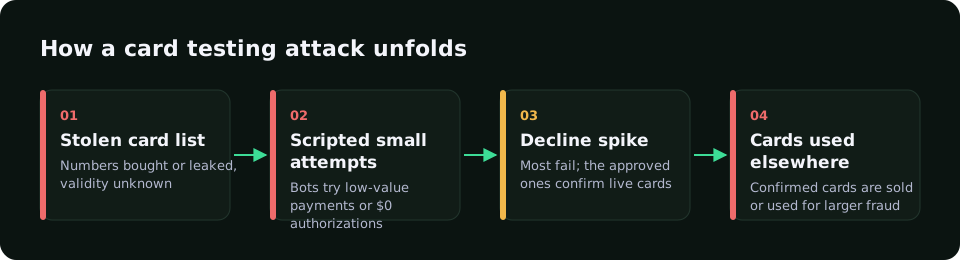
- Checkout, to stop card testing and BIN attacks.
- Login, to slow credential stuffing and account takeover.
- Signup and promo flows, to stop fake accounts and promo farming.
- Password reset and OTP endpoints, to stop SMS pumping and OTP bots.
Rolling out without hurting conversion
Start in monitor mode and measure how much traffic would be challenged. Compare against approvals, chargebacks and support tickets before you enforce.
Use challenges for the middle band and hard blocks only for very clear automation. Review false positives every week during rollout.
How RiskCogs uses bot signals
RiskCogs combines device, IP, account and payment context into one risk score with reasons. Bot-like signals raise the score at checkout and signup, and rules can send those events to challenge or review instead of a hard decline.
You can test new bot rules in shadow mode on live traffic before they affect customers. RiskCogs is a risk scoring layer next to your payment provider. It does not process payments and does not file or fight disputes for you. See the pricing page for plans.
See what you would have blocked — free shadow modeFrequently asked questions
What is advanced bot protection?
It is bot defence that scores each request using many signals, such as client integrity, device fingerprints, network data, behaviour and velocity, instead of relying only on IP blocklists or a CAPTCHA. It then allows, challenges or blocks traffic based on risk.
Is a CAPTCHA enough to stop bots?
Usually not on its own. Solver services and human click farms pass many CAPTCHAs, and challenges on every visit hurt conversion. CAPTCHAs work best as one step-up option for medium-risk traffic inside a wider bot protection setup.
What is the difference between bot detection and bot protection?
Bot detection decides whether a request looks automated. Bot protection is what you do with that answer: rate limits, challenges, blocks and monitoring across pages. Advanced bot protection joins both and tunes the response to the page and the risk.
Can bot protection block real customers?
Yes, if thresholds are too strict. Shared networks, privacy browsers and assistive tools can look unusual. Start in monitor mode, use challenges rather than blocks for borderline traffic, and review false positives before tightening rules.
Sources and related reading
- OWASP Automated Threats to Web Applications project, named as a text source only.