
Payment gateway fraud detection: adding risk checks before authorization
Payment gateway fraud detection means checking each payment for fraud risk before the gateway sends it for authorization. Built-in gateway tools see card and amount data; a separate risk layer can add device, account and behaviour signals from your own checkout, score the payment and decide whether it should reach the gateway at all.
Updated · RiskCogs team
Key facts
- A payment gateway passes payment data to the acquirer and card networks for authorization.
- Checks before authorization avoid fees on attempts you would decline anyway.
- Merchants that use several gateways often want one consistent fraud policy across all of them.
- Device and session signals come from your checkout, not from the gateway.
What gateway tools see and what they miss
A gateway sees the card, the amount, the billing address and the authorization result. It usually does not see how the shopper behaved on your site, how old the account is, or whether the same device has tried ten other cards today. That context lives in your application, so the strongest fraud checks combine both.
Where to place the risk check
- Collect order, account and device data at checkout.
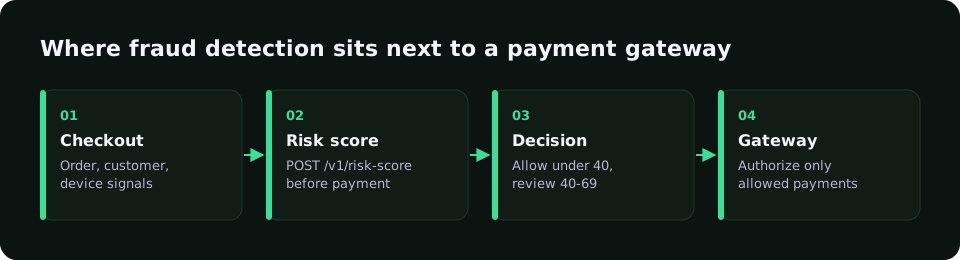
- Request a risk score before you create the payment with the gateway.
- Allow low-risk payments straight through.
- Send medium-risk payments to review or step-up authentication such as 3-D Secure.
- Decline high-risk payments without sending them to the gateway.
Signals that matter at the gateway step
- Distinct cards per device or session.
- Repeated declines in a short window.
- BIN country versus IP country.
- Prepaid or virtual card flags.
- New account placing a large first order.
How RiskCogs works next to your gateway
RiskCogs is a risk scoring layer next to your existing payment provider; it does not process payments. Call POST /v1/risk-score before you create the payment and get a score with reasons: below 40 allow, 40 to 69 review, 70 or above block.
Because the check runs in your own flow, the same policy applies whichever gateway handles the payment. The Shadow plan is free for 500 decisions so you can measure impact before enforcing anything.
See what you would have blocked — free shadow modeFrequently asked questions
Do payment gateways have fraud detection?
Many gateways include basic fraud tools such as address and CVC checks, velocity limits or rules. They work on the data the gateway receives. A separate risk layer adds context from your checkout and account system, and keeps one policy if you route payments through more than one gateway.
Should fraud checks run before or after authorization?
For most card-not-present payments, before. A check before authorization lets you decline or step up risky payments without paying for a doomed authorization attempt, and it stops card testing from reaching the card networks. Post-authorization review still helps for high-value orders shipped later.
Does adding a risk check slow down checkout?
A risk score request is a single API call made while the order is being prepared, so it adds little to the overall checkout time. Low-risk payments flow straight through, and only a minority of payments should see review or extra authentication steps.
Sources and related reading
- EMVCo, EMV 3-D Secure Protocol and Core Functions Specification, public edition.
- PCI Security Standards Council, PCI DSS v4.0, public edition.
Measure first. Enforce when ready.
Run RiskCogs in shadow mode next to your existing payment setup and review the decisions before they affect a single customer.