Transaction risk scoring: how a fraud score is built and used
Transaction risk scoring gives each payment a number that shows how likely it is to be fraud, based on signals such as device, IP, card BIN, email and customer history. You map score ranges to actions: approve, review or block. Good scores explain themselves with reason codes and improve as you send real outcomes back.
Updated · RiskCogs team
Key facts
- A score is a ranking of risk, not proof of fraud; the action depends on thresholds you choose.
- Reason codes show which signals moved the score, which matters for review and for tuning.
- Thresholds are a trade-off between fraud losses, false declines and review workload.
- Outcome feedback such as chargebacks and approved refunds keeps the score aligned with your traffic.
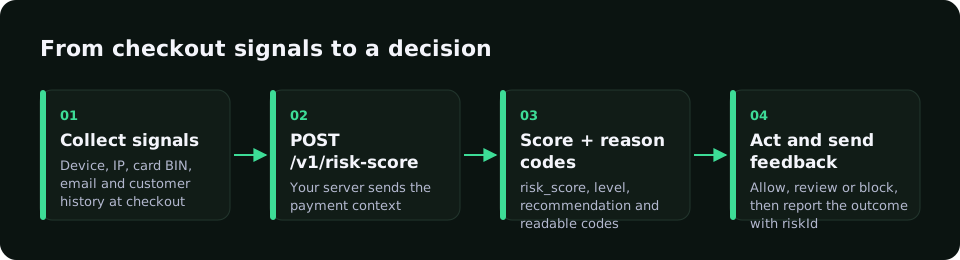
What goes into a risk score
- Device signals: first-seen device, automation and tampering traces.
- Network signals: data-center, VPN or Tor IP, location mismatches.
- Card signals: BIN country, prepaid or virtual cards, AVS and 3-D Secure results.
- Identity signals: disposable email, many devices or IPs per email or phone.
- History: earlier chargebacks, refunds and approved payments.
- Your own rules and allow, watch and block lists.
How to set and tune thresholds
- Score real traffic in shadow mode without changing decisions.
- Compare score ranges with outcomes such as chargebacks and refunds.
- Pick a block threshold where fraud is high and good customers are rare.
- Send the middle band to review or 3-D Secure.
- Recheck thresholds monthly and after any new attack pattern.
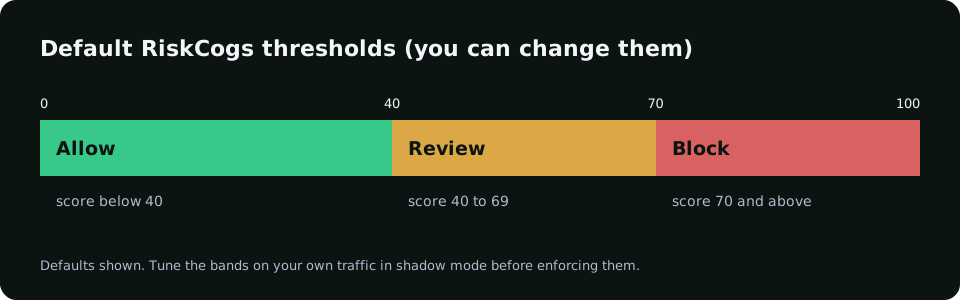
Example score bands
| Score band | Action | Notes |
|---|---|---|
| Low | Approve | Most good customers land here |
| Middle | Review or 3-D Secure | Size the band to your review team |
| High | Block | Check false positives in shadow mode first |
How RiskCogs scores a transaction
RiskCogs returns a risk_score, a level and a recommendation for each request to POST /v1/risk-score, together with readable reason codes such as ip_datacenter, bin_country_mismatch_ip, email_disposable or trust_same_device_as_last_approved. Default bands are allow under 40, review 40 to 69 and block from 70, and you can change them.
Send outcomes to the feedback endpoint with the riskId so the scores reflect your own traffic. Shadow mode is free on the Shadow plan.
See what you would have blocked — free shadow modeFrequently asked questions
What is a good fraud risk score threshold?
There is no universal number. The right threshold depends on your fraud rate, margins, review capacity and how much friction your customers accept. Score your own traffic in shadow mode, compare score ranges with real outcomes, and set block and review bands where the trade-off works for your business.
How is a risk score different from a rules engine?
Rules check fixed conditions and give a yes or no answer, such as more than ten attempts in two minutes. A risk score weighs many signals together into one number. Most teams use both: the score ranks risk, and rules handle clear cases and business policies on top of it.
Why do risk scores need outcome feedback?
Fraud patterns and customer behaviour change. When you send back what happened to each payment, such as a chargeback, a refund or a clean approval, the scoring can learn which signals matter for your traffic, so it gets better at separating good customers from fraud over time.
Sources and related reading
- European Banking Authority, RTS on strong customer authentication, transaction risk analysis exemption (Article 18).
- Visa, Visa Core Rules and Visa Product and Service Rules (public edition).
Measure first. Enforce when ready.
Run RiskCogs in shadow mode next to your existing payment setup and review the decisions before they affect a single customer.