
How to choose fraud detection software: a practical checklist
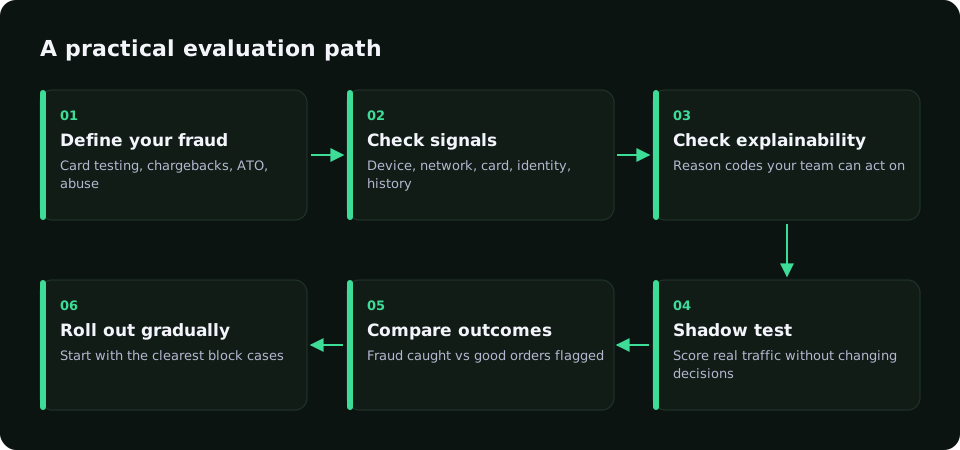
Choose fraud detection software by testing it on your own traffic, not by reading feature lists. Start from the fraud you actually see, check which signals the tool uses and whether it explains each decision, compare pricing models on your volumes, and run it in shadow mode before it blocks anything.
Updated · RiskCogs team

Key facts
- Different tools are built for different problems: card-not-present payment fraud, account takeover, promotion abuse or AML.
- Explainable decisions with reason codes make tuning and customer support much easier than a bare score.
- Pricing models differ: per transaction, per decision, percentage of volume, or flat plans with included usage.
- A shadow test on real traffic is the most reliable way to compare tools before switching anything on.
Start with the fraud you actually have
Most buying mistakes happen before any vendor call. A team sees a spike in chargebacks, searches for fraud detection software, and compares tools on long feature lists. The tool they pick may be excellent at a problem they do not have.
Before you look at products, write down the fraud you are seeing and what it costs. Pull the last few months of chargebacks and group them by reason code. Look at decline logs for bursts of small attempts, which point to card testing. Check support tickets for customers locked out of their accounts. Ask finance how many orders were refunded because of suspected fraud.
Also write down what you cannot afford to get wrong. For a high-margin digital product, a few extra fraud losses may be acceptable if it means no good customer is ever declined. For expensive physical goods that ship overnight, the balance tips the other way. That tolerance, more than any feature, decides which tool and which thresholds suit you.
You will usually find one or two dominant patterns. An online store might mostly see stolen cards and item-not-received disputes. A gaming operator might mostly see bonus abuse and multi-accounting. A subscription business might mostly see card testing on its signup form. That list becomes the test every tool must pass.
The signals a tool should cover
Fraud detection is only as good as the signals it sees. Ask every vendor which of these they collect, how, and whether you need extra integration work for each.
- Device: a device identifier, signs of automation or emulators, and whether the device has been seen before.
- Network: IP reputation, data-center, VPN, proxy and Tor detection, and location consistency.
- Card: BIN country, card type such as prepaid, and AVS, CVV and 3-D Secure results from your payment provider.
- Identity: email age and type, phone checks, and how many accounts share the same details.
- Behaviour and velocity: attempts per card, per device and per IP over short windows.
- History and outcomes: earlier approvals, refunds and chargebacks for the same customer, card or device.
Explainability is not optional
A score of 82 tells you nothing about what to do next. A score of 82 with reasons such as data-center IP, card country different from IP country, and email created today tells your analyst exactly what to check and tells your developer which rule to adjust.
Ask to see real decision output during the evaluation. Can your support team read it when a customer complains about a decline? Can your risk team export it to analyse false positives? Can you write your own rules on top of the score? Tools that only return a number and a recommendation make tuning slow, because every change becomes a ticket to the vendor.
Integration and operations
- How is the tool called: a server-side API before authorisation, a plugin in your payment provider, or a batch review after the fact?
- Does it need a browser or mobile SDK for device signals, and what does that add to page weight?
- What latency does the scoring call add to checkout, and what happens if the service is unreachable?
- Does it work with all your payment providers, or only one?
- How do you send outcomes such as chargebacks and refunds back, and how quickly do they affect scores?
- Who owns the rules day to day: your team, the vendor, or both?
Understand the pricing model
Pricing in this market comes in very different shapes, which makes comparisons tricky. Some tools charge a fee per screened transaction. Others charge a percentage of approved volume, sometimes with a model where the vendor covers losses on approved orders in exchange for a higher fee. Others sell monthly plans with an included number of decisions and overage fees above that.
To compare fairly, model each option on your own numbers: monthly transactions, average order value, expected growth and the share of payments you would score. Include the cost of the team time each tool needs. A cheaper tool that needs a full-time analyst to tune it may cost more overall.
Run a shadow test before you buy
- Integrate the tool so it scores live payments but does not change any decision.
- Let it run long enough to collect outcomes. Chargebacks arrive weeks after the payment, so a few days is not enough.
- Match each scored payment with what actually happened: clean, refunded, or charged back.
- Count how much fraud the tool would have blocked at different thresholds, and how many good orders it would have stopped.
- Compare those numbers with your current setup, and pick thresholds you can defend.
- Switch on enforcement for the clearest cases first, then widen it as confidence grows.
Red flags during an evaluation
Some warning signs show up early if you know to look for them. Be careful when a vendor will not let you test on your own traffic before signing, or only shares results from other merchants. Fraud patterns vary a lot between industries, and someone else's numbers say little about yours.
Be wary of tools that cannot show why a payment was declined. Sooner or later a good customer will be blocked and will complain, and your support team needs an answer better than "the system said no". The same goes for rules you cannot see or change.
Watch for pricing that only makes sense at today's volume. Ask for a quote at several times your current traffic, and check how overages are billed. Also check the exit: can you export your decision history and rules if you leave, and how long is the minimum contract?
Finally, be sceptical of any claim that a tool stops all fraud or removes the need for review. Every system makes trade-offs between fraud caught and good customers declined. A vendor who is open about that trade-off, and helps you set it, is usually a better partner than one who denies it exists.
Questions to ask every vendor
- Which fraud types is your product designed for, and which is it not built for?
- Can we see the reason codes for every decision, and export them?
- Can we run in shadow mode on our own traffic before enforcing?
- How do outcomes we send back change our scores, and how quickly?
- What happens to checkout if your API times out?
- Where is our data processed and stored, and under which contract terms?
- What does our bill look like at today's volume and at three times today's volume?
Where RiskCogs fits
RiskCogs is built for card-not-present payment risk alongside your existing payment provider. Each call to POST /v1/risk-score returns a risk_score, a recommendation and readable reason codes, with default bands of allow under 40, review 40 to 69 and block from 70. Outcomes go back through POST /v1/risk-feedback.
Shadow mode is the default starting point, so you can run the evaluation above on your own traffic. Plans are monthly: Shadow is €0, Starter €49 and Growth €299, each with included decisions shown on the pricing page.
See what you would have blocked — free shadow modeFrequently asked questions
What is the best fraud detection software?
There is no single best tool. The right choice depends on your fraud types, payment providers, volumes and team. A tool that is excellent for card testing on a small store may be a poor fit for an iGaming operator fighting bonus abuse. Shortlist two or three, then compare them in shadow mode on your own traffic.
How long should a fraud tool trial last?
Long enough to see outcomes. Chargebacks can arrive weeks or months after a payment, so a short trial mostly shows you scores, not results. Many teams score live traffic in shadow mode for at least a full billing cycle and then compare the scores against chargebacks and refunds that come in.
Do small merchants need fraud detection software?
Small merchants are often targeted for card testing because their checkouts have fewer controls. Basic protection such as velocity limits, CVV and AVS checks, and 3-D Secure goes a long way. Dedicated software becomes worth it once fraud losses, chargeback fees or review time cost more than the tool.
Can I use more than one fraud tool?
Yes, and many merchants do, for example a payment provider's built-in screening plus a separate scoring service with its own rules. The risk is conflicting decisions and duplicated cost. Decide which tool makes the final call, log both outputs, and review overlap regularly.
Sources and related reading
- European Banking Authority, RTS on strong customer authentication, Article 18 transaction risk analysis.
- Visa, Visa Core Rules and Visa Product and Service Rules (public edition).
Measure first. Enforce when ready.
Run RiskCogs in shadow mode next to your existing payment setup and review the decisions before they affect a single customer.